Timing methods
This notebook demonstrates some of the “quick-look” timing analyses available in opticam, as well as how to extend the available timing analyses using `stingray <https://docs.stingray.science/en/stable/>`__.
Generating and Reducing Data
Before we can explore the different timing analyses provided in opticam, we need some light curves to analyse. For this example, I’ll generate and reduce some gappy observations (see the reduction tutorial for more details on data reduction):
[1]:
from pathlib import Path

import opticam


out_dir = Path('out')

opticam.generate_gappy_observations(
    out_directory=out_dir / 'data',
    n_images=500,  # generate lots of observations to create long light curves
    binning_scale=8,  # use large binning scale to reduce disk space
    circular_aperture=False,  # disable circular aperture shadow for simplicity
)

reducer = opticam.Reducer(
    data_directory=out_dir / 'data',
    out_directory=out_dir / 'reduced',
    show_plots=False,
    verbose=False,
    )
reducer.create_catalogs()

phot = opticam.OptimalPhotometer()
reducer.photometry(phot)

dphot = opticam.DifferentialPhotometer(
    out_directory=out_dir / 'reduced',
)
analyser = dphot.get_relative_light_curve(
    key='1:g',
    target=2,
    comparisons=1,
    phot_label='optimal',
    prefix='source_2',  # name of target source
    match_other_cameras=True,
    show_diagnostics=False,
)
[OPTICAM] variable source is at (65, 57)
[OPTICAM] variability RMS: 0.02 %
[OPTICAM] variability frequency: 0.135 Hz
[OPTICAM] variability phase lags:
    [OPTICAM] g-band: 0.000 radians
    [OPTICAM] r-band: 1.571 radians
    [OPTICAM] i-band: 3.142 radians
Generating observations: 100%|███████████████████████████████████████████████████████████████████████████████████████████████████████████████████████████████████████████████████████████|[00:19<00:00]
[OPTICAM] Scanning data directory: 100%|█████████████████████████████████████████████████████████████████████████████████████████████████████████████████████████████████████████████████|[00:03<00:00]
[OPTICAM] Checking instrument OPTICAM_MX.
[OPTICAM] OPTICAM_MX sucessfully passed all checks.
/home/zac/Documents/University/PhD/Repos/opticam/opticam/utils/data_checks.py:227: UserWarning: Large time gap detected between 240101i200000227o.fits.gz and 240101r200000187o.fits.gz (48.995 s compared to the median time difference of 1.000 s). This may cause alignment issues. If so, consider moving all files after this gap to a separate directory.
  warnings.warn(string)
/home/zac/Documents/University/PhD/Repos/opticam/opticam/utils/data_checks.py:227: UserWarning: Large time gap detected between 240101r200000450o.fits.gz and 240101r200000189o.fits.gz (19.998 s compared to the median time difference of 1.000 s). This may cause alignment issues. If so, consider moving all files after this gap to a separate directory.
  warnings.warn(string)
/home/zac/Documents/University/PhD/Repos/opticam/opticam/utils/data_checks.py:227: UserWarning: Large time gap detected between 240101g200000172o.fits.gz and 240101r200000195o.fits.gz (58.994 s compared to the median time difference of 1.000 s). This may cause alignment issues. If so, consider moving all files after this gap to a separate directory.
  warnings.warn(string)
/home/zac/Documents/University/PhD/Repos/opticam/opticam/utils/data_checks.py:227: UserWarning: Large time gap detected between 240101g200000389o.fits.gz and 240101g200000455o.fits.gz (10.999 s compared to the median time difference of 1.000 s). This may cause alignment issues. If so, consider moving all files after this gap to a separate directory.
  warnings.warn(string)
/home/zac/Documents/University/PhD/Repos/opticam/opticam/utils/data_checks.py:227: UserWarning: Large time gap detected between 240101r200000002o.fits.gz and 240101g200000460o.fits.gz (24.998 s compared to the median time difference of 1.000 s). This may cause alignment issues. If so, consider moving all files after this gap to a separate directory.
  warnings.warn(string)
[OPTICAM] Plot saved to /tmp/tmpcartnu5r/out/reduced/diag/header_times.pdf.
[OPTICAM] Plot saved to /tmp/tmpcartnu5r/out/reduced/cat/catalogs.pdf.
[OPTICAM] Plot saved to /tmp/tmpcartnu5r/out/reduced/diag/background.pdf.
[OPTICAM] Plot saved to /tmp/tmpcartnu5r/out/reduced/diag/optimal_rms_vs_median.pdf.
[OPTICAM] Keys: 1:g, 2:r, 3:i
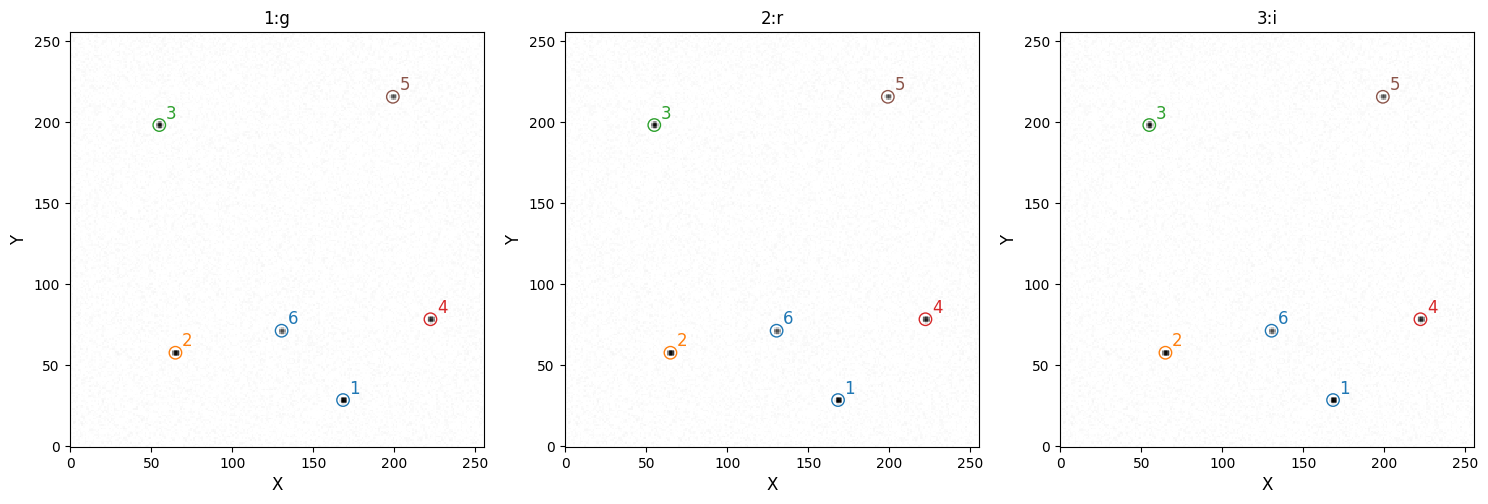
[OPTICAM] 1:g target ID 2 was matched to 2:r target ID 2
[OPTICAM] 2:r comparison ID 1 was matched to 2:r comparison ID 1
[OPTICAM] 1:g target ID 2 was matched to 3:i target ID 2
[OPTICAM] 3:i comparison ID 1 was matched to 3:i comparison ID 1
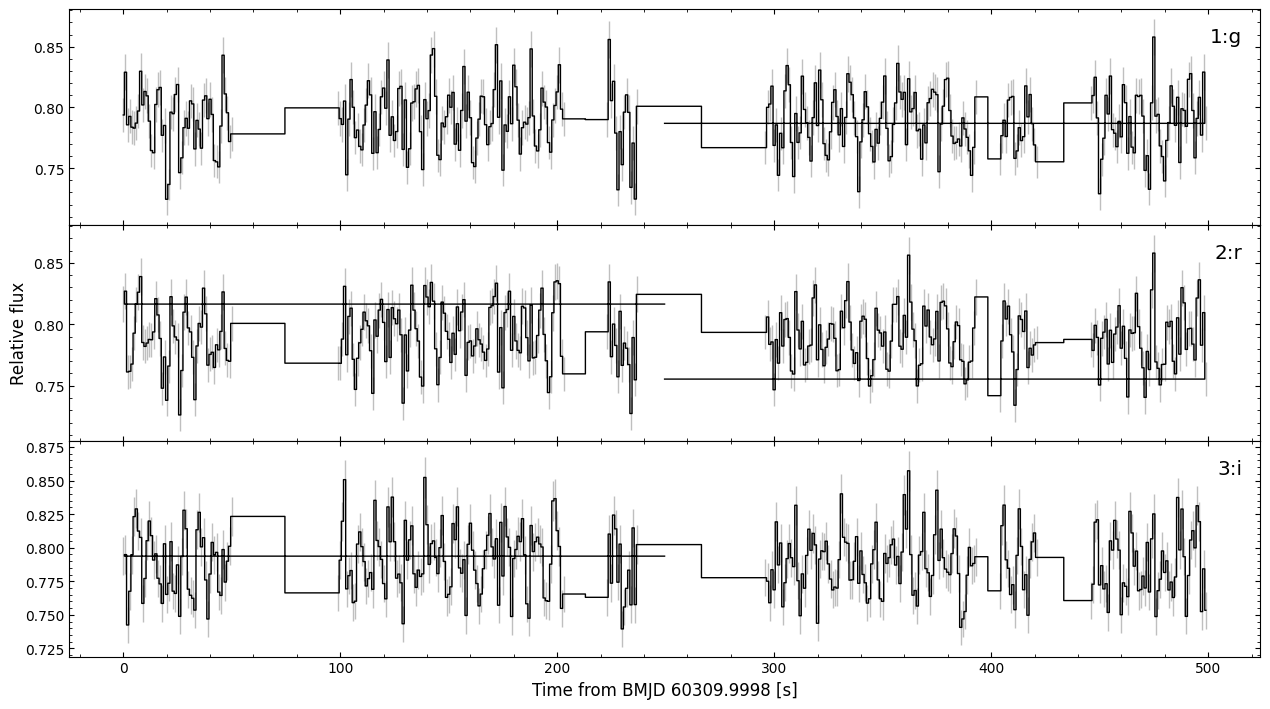
We now have an Analyzer instance that provides a number of quick-look timing analyses routines. Under-the-hood, these routines mostly astropy routines.
opticam.Analyzer routines
Let’s first take a look at our Analyzer light curves using the plot() method:
[2]:
analyser.plot()
[OPTICAM] Plot saved to /tmp/tmpcartnu5r/out/reduced/plots/source_2_optimal_light_curves.pdf.
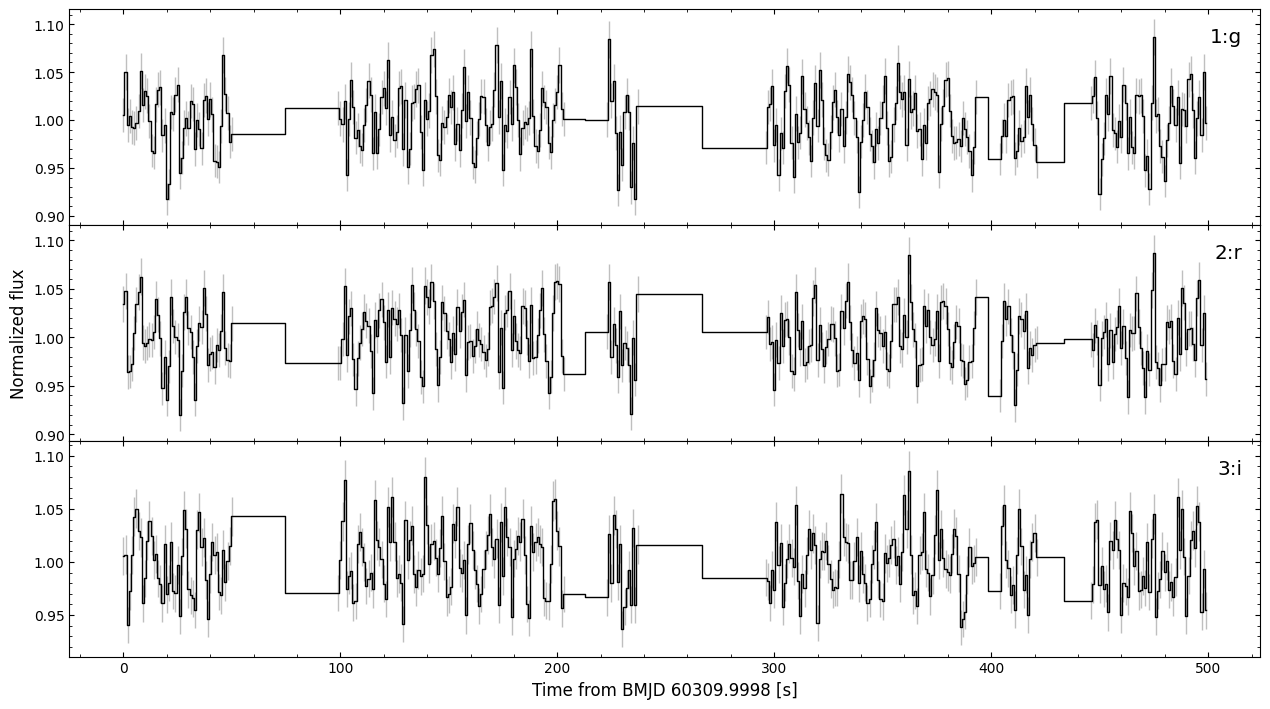
As we can see, we have three variable, gappy light curves. The filter for each light curve is shown in the top right. We can also see that this figure was saved to timing_analysis_tutorial/reduced/plots/source_2_optimal_light_curves.pdf.
We can inspect our light curve data via the light_curves attribute. Within an Analyzer, light curves are stored as `astropy.timeseries.TimeSeries <https://docs.astropy.org/en/stable/timeseries/index.html>`__ instances:
[3]:
analyser.light_curves.pprint()
       time           1:g_rel_flux    ...   3:i_rel_flux_err
------------------ ------------------ ... --------------------
60309.999802757935  1.005223166710537 ... 0.018053781758420755
 60309.99981433087 1.0498305410805062 ...  0.01801955262060396
  60309.9998259038  0.994954663791711 ...  0.01696111565591557
 60309.99983747672 1.0037347424438734 ...  0.01735700481506178
 60309.99984904965 0.9925015837411737 ...   0.0179718985277651
 60309.99986062257  0.991501297690821 ...  0.01832991721821542
  60309.9998721955 0.9967683483690362 ...  0.01838191547561879
60309.999883768425  1.009360726110968 ...   0.0182026830036609
 60309.99989534135   1.05083019208859 ... 0.018276214355731273
 60309.99990691428 1.0157049915770313 ... 0.017376938239378352
               ...                ... ...                  ...
 60310.00547349178 0.9934200037948102 ... 0.017046791415874313
 60310.00548506471 1.0424497583184145 ... 0.017587275533682143
60310.005496637634 1.0483313282424795 ...  0.01823179349896665
 60310.00550821056 1.0098971394037708 ... 0.018157185431735307
 60310.00551978349 0.9605488619203572 ... 0.017959285571002334
 60310.00553135641 1.0016702005069376 ... 0.018506986344670014
60310.005542929335 1.0236058660796536 ...  0.01819348638885747
 60310.00555450227 0.9842514028780169 ...  0.01713384419031292
 60310.00556607519 1.0499449800605283 ... 0.017740784630403184
 60310.00557764812 0.9965017926216742 ... 0.017232314926851348
Length = 341 rows
We can also rebin our light curves to a lower time resolution using the rebin() method:
[4]:
from astropy import units as u

binned_analyser = analyser.rebin(time_bin_size=3 * u.s)
This method takes a time_bin_size parameter, which must be a astropy.units.Quantity, and returns a new Analyzer instance containing the binned light curves. Let’s take a look at these binned light curves:
[5]:
binned_analyser.plot(save=False)
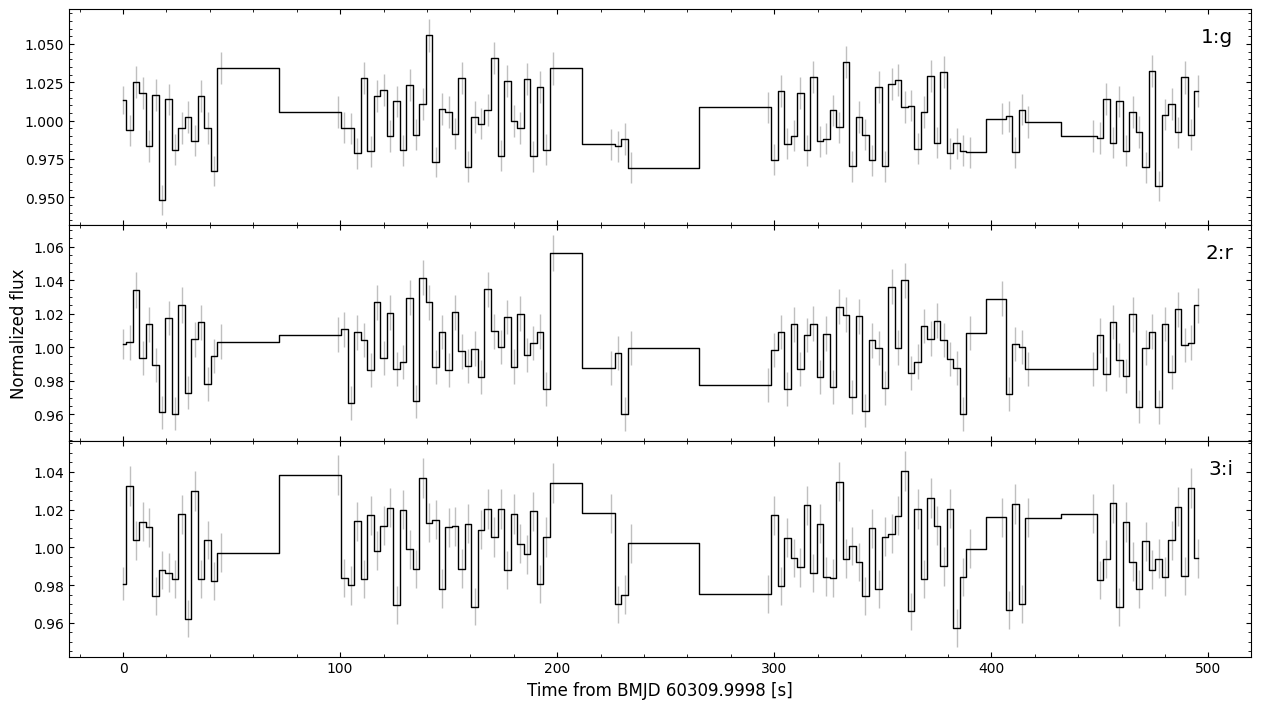
opticam handles the error propagation during binning and avoids padding gaps in the original light curves with zeros.
Let’s now perform a few quick-look timing analyses on these light curves.
Lomb-Scargle Periodograms
Often times, you might want to compute the Lomb-Scargle periodograms of your light curves to check for periododic signals. astropy implements two flavours of the Lomb-Scargle periodogram: `LombScargle <https://docs.astropy.org/en/stable/timeseries/lombscargle.html>`__ and `LombScargleMultiband <https://docs.astropy.org/en/stable/timeseries/lombscarglemb.html>`__. For convenience, opticam’s Analyzer class implements wrappers for both routines that handle the boilerplate,
allowing you to get straight to the analysis.
Lomb-Scargle
Let’s first take a look at the standard Lomb-Scargle periodogram:
[6]:
lsps = analyser.lomb_scargle()
[OPTICAM] Plot saved to /tmp/tmpcartnu5r/out/reduced/plots/source_2_LSP.pdf.
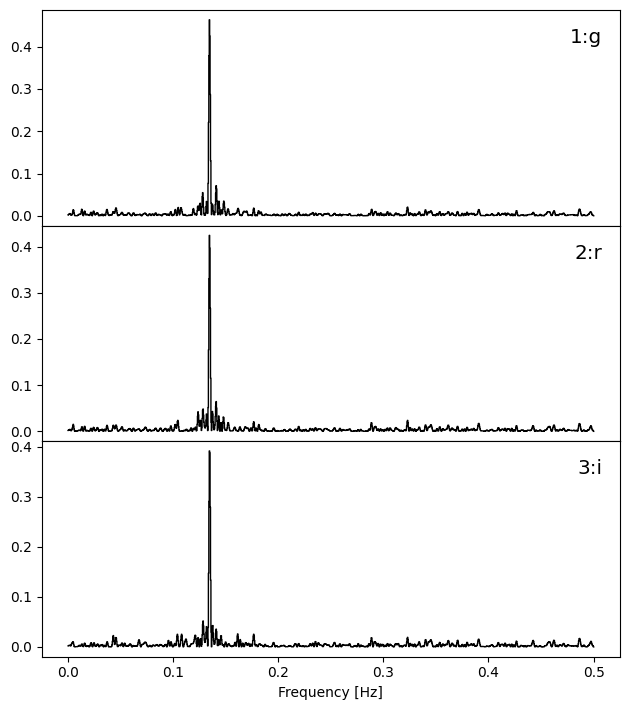
We can see that each light curve has a dedicated periodogram, and the corresponding filter is shown in the top right of each panel. In this case, all three periodograms show a sharp peak between 0.1 and 0.2 Hz.
By default, the autofrequency() method of astropy’s LombScargle class is used to construct the frequency grid of the periodogram. Alternatively, you may pass your own frequency grid. To avoid confusion with units, custom frequency grids must be passed as an astropy `Quantity <https://docs.astropy.org/en/stable/units/quantity.html>`__. For example, let’s recompute these periodograms in the 0.1-0.2 Hz frequency range. However, we do not want to overwrite our previous plot, so
we’ll also pass save=False to prevent the new plot from being saved:
[7]:
from astropy import units as u
import numpy as np

frequency = np.linspace(0.1, 0.2, 100) * u.Hz  # units of Hz

lsps = analyser.lomb_scargle(frequency=frequency, save=False)
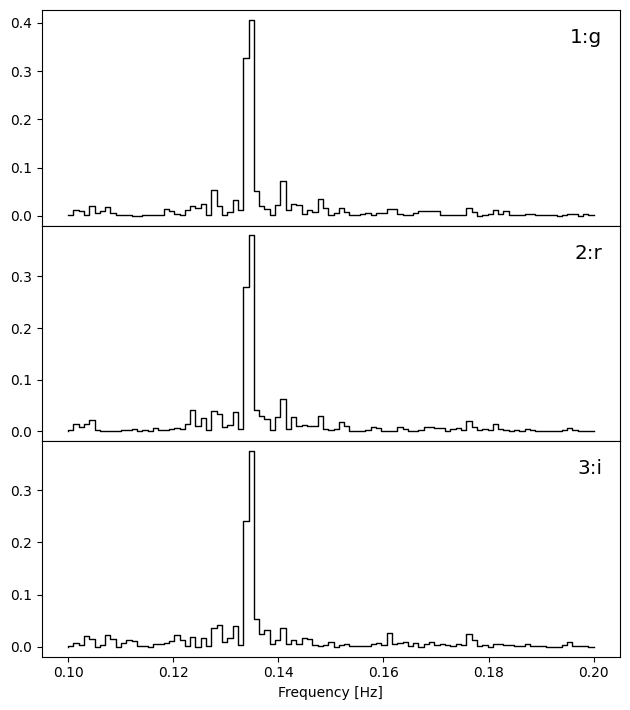
Now we can see that all three bands suggest a signal with a frequency of between 0.12 and 0.14 Hz.
Like many of the timing analysis methods of Analyzer, lomb_scargle() returns a dictionary of results that may be used to conduct further analyses. In this case, the keys list the filters and the values list the corresponding `astropy.timeseries.LombScargle <https://docs.astropy.org/en/stable/api/astropy.timeseries.LombScargle.html#astropy.timeseries.LombScargle.from_timeseries>`__ instances:
[8]:
lsps
[8]:
{'1:g': <astropy.timeseries.periodograms.lombscargle.core.LombScargle at 0x72f58cc1fa80>,
 '2:r': <astropy.timeseries.periodograms.lombscargle.core.LombScargle at 0x72f58cc1f5c0>,
 '3:i': <astropy.timeseries.periodograms.lombscargle.core.LombScargle at 0x72f5475ea330>}
Let’s use the results returned by the lomb_scargle() method to precisely infer the peak frequencies:
[9]:
import numpy as np

for fltr, lsp in lsps.items():
    power = lsp.power(frequency=frequency)
    peak_index = np.argmax(power)
    print(f'{fltr} Peak frequency = {frequency[peak_index]}')
1:g Peak frequency = 0.13535353535353536 Hz
2:r Peak frequency = 0.13535353535353536 Hz
3:i Peak frequency = 0.13535353535353536 Hz
Now we can see that all three bands show a periodicity at \(\sim\) 0.135 Hz which, as we can see at the top of this notebook, is the true frequency of variability for our source of interest.
Multiband Lomb-Scargle
In some cases, it may be preferable to compute a single Lomb-Scargle periodogram for all light curves; this can be done using astropy’s `LombScargleMultiband <https://docs.astropy.org/en/stable/timeseries/lombscarglemb.html>`__:
[10]:
periodograms = analyser.multiband_lomb_scargle()
[OPTICAM] Plot saved to /tmp/tmpcartnu5r/out/reduced/plots/source_2_multiband_LSP.pdf.
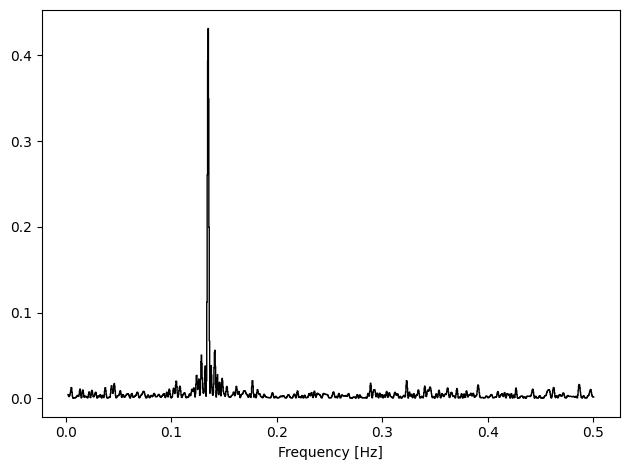
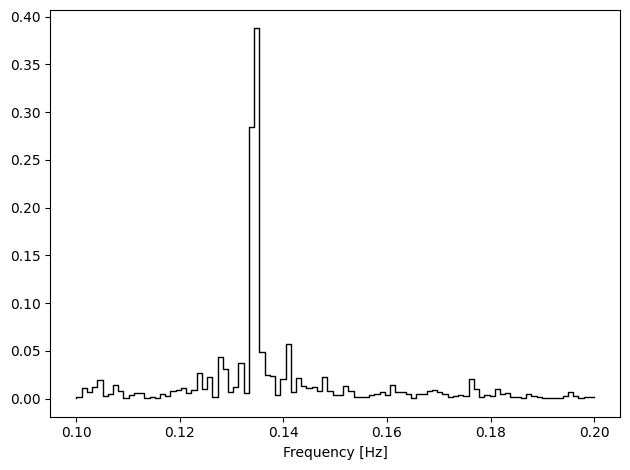
As with lomb_scargle(), custom frequency grids can also be passed to multiband_lomb_scargle():
[11]:
periodograms = analyser.multiband_lomb_scargle(frequency=frequency, save=False)
Phase Folding/Binning
Now that we have identified a candidate signal, we may want fold our light curves to see what it looks like. astropy’s TimeSeries class implements a fold() method, and opticam’s Analyzer class provides a convenience wrapper for this method with some added functionality (binning). To fold a light curve, we need a period on which to fold; to avoid confusion with units, opticam requires that the period being passed is a Quantity:
[12]:
f_signal = 0.135 * u.Hz  # periodogram peak frequency
p_signal = (1 / f_signal).to(u.s)  # fold period in seconds

folded_lcs = analyser.fold(
    period=p_signal,
    save=False,
)
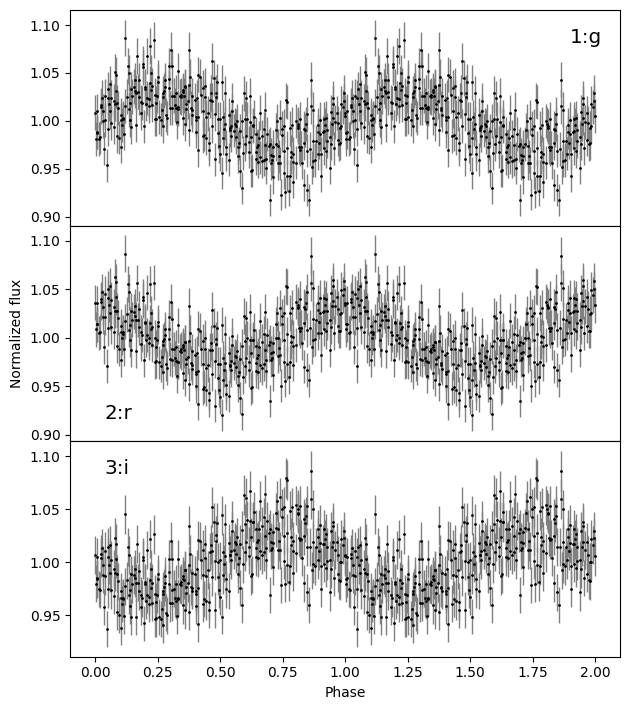
The fold() method of opticam.Analyzer returns a TimeSeries whose "time" column quantifies the folded phase:
[13]:
folded_lcs.pprint()
       phase            1:g_rel_flux    ...   3:i_rel_flux_err
                                        ...
-------------------- ------------------ ... --------------------
-0.49985981220396775 1.0084651144001064 ...  0.01802196150699383
-0.49718195758777584 0.9811767231422861 ... 0.017575578214714924
-0.49436433950922115 0.9876757855816458 ...  0.01755302456280664
 -0.4916866546265685    0.9879181537652 ... 0.017331740226355953
 -0.4915470608977449 1.0099730131202092 ... 0.017647202182194854
-0.48605158820299826 0.9810156860573014 ... 0.017305929295081564
 -0.4805560306414821 0.9826227888240194 ... 0.017318387558139955
 -0.4752006608761759  1.016188197622447 ... 0.017869565051610248
 -0.4750604730799659 1.0143944262100788 ...  0.01794700982530723
                 ...                ... ...                  ...
 0.47252357006055423 0.9976950354043079 ...  0.01789898021873436
  0.4753411032723394 0.9758368526118509 ...  0.01753922657596166
   0.478018788154992 0.9928939459409717 ...  0.01769760879460673
  0.4808365759670859 0.9766191019467554 ... 0.017530982059288297
 0.48351417598297086 0.9947556028162705 ...  0.01789619937233157
 0.48365385457856225 1.0178884964880388 ...  0.01836674530230763
  0.4918272667562702 1.0143043565354442 ...  0.01807372693159667
  0.4945047819053846  1.020804624131791 ... 0.018127284072123565
  0.4973226545842472 1.0292663471143286 ... 0.018169295411921093
  0.4999999999998224  1.005223166710537 ... 0.018053781758420755
Length = 341 rows
Additionally, the fold() method can be used to phase bin your light curves by passing the desired number of bins to to the nbins parameter:
[14]:
folded_lcs = analyser.fold(
    period=p_signal,
    nbins=20,
    save=False,
    )
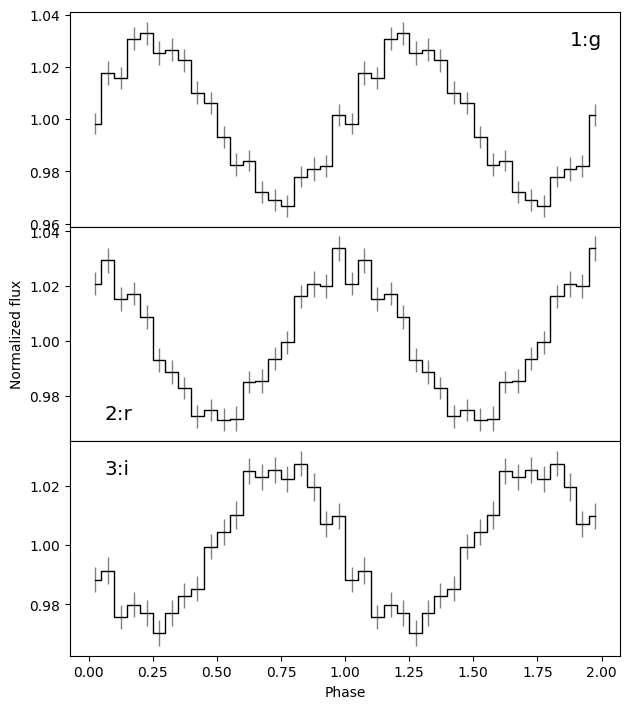
Phase binning more clearly reveals the pulse shape compared to simply folding. From the above plots, it’s clear that there is a lag in the pulsations between the different bands. Currently, opticam does not support quantify lags natively. However, opticam’s Analyzer class can be used to export your light curves to `stingray <https://docs.stingray.science/en/stable/>`__, which provides a much more complete timing analysis framework - including ways to compute lags. Let’s take a
look at this now.
stingray
stingray is a feature-rich spectral timing Python package developed primarily for use with X-ray data. stingray implements a number of generic timing analyis routines that can be applied to arbitrary time series. However, since stingray was developed with X-ray data in mind, it makes certain assumptions about the data. These assumptions can cause issues for non-X-ray data, as we’ll see soon.
To export your light curves to stingray, call the export_light_curves_to_stingray() method of opticam.Analyzer:
[15]:
stingray_lcs = analyser.export_light_curves_to_stingray()
/home/zac/miniforge3/envs/opticam6/lib/python3.14/site-packages/stingray/utils.py:487: UserWarning: SIMON says: Stingray only uses poisson err_dist at the moment. All analysis in the light curve will assume Poisson errors. Sorry for the inconvenience.
  warnings.warn("SIMON says: {0}".format(message), **kwargs)
We can see that a warning about error distributions has been triggered. We’ll take a look at this in more detail later. For now, let’s ignore it.
export_light_curves_to_stingray() returns a dictionary of {filter: `stingray.Lightcurve <https://docs.stingray.science/en/stable/notebooks/Lightcurve/Lightcurve%20tutorial.html>`__} pairs:
[16]:
stingray_lcs
[16]:
{'1:g': <stingray.lightcurve.Lightcurve at 0x72f5474560d0>,
 '2:r': <stingray.lightcurve.Lightcurve at 0x72f547455e50>,
 '3:i': <stingray.lightcurve.Lightcurve at 0x72f547456490>}
Let’s take a closer look at one of these light curves using the plot() method of stingray.Lightcurve:
[17]:
ax = stingray_lcs['1:g'].plot()
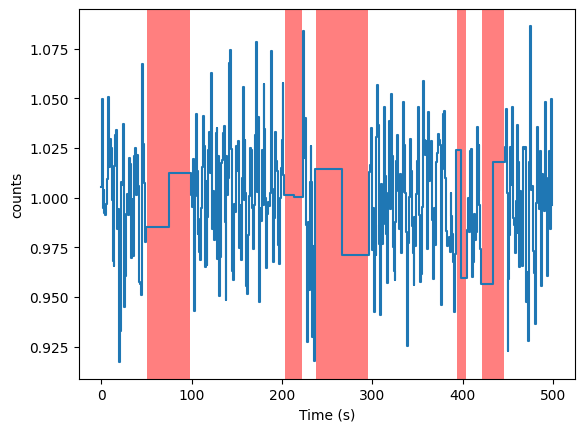
As we can see, the light curve times are converted into seconds, with \(t=0\) corresponding to the t_ref attribute of the Analyzer instance. Additionally, opticam has automatically inferred GTIs for each light curve, which are required for compatibility with many of stingray’s methods. The shaded regions in the above plot represent the time between GTIs. Let’s use these stingray.Lightcurve instances to do some more advanced analyses.
Lags
Cross-correlation
Having recognised a lag between our light curves, there are several ways we can quantify it. For example, we can use the cross-correlations between light curves. This is a relatively simple approach, but it has the benefit of working with arbitrary time series. We can compute cross-correlations in stingray using `CrossCorrelation <https://docs.stingray.science/en/stable/notebooks/CrossCorrelation/cross_correlation_notebook.html>`__:
[18]:
from stingray.crosscorrelation import CrossCorrelation

cross_corr = CrossCorrelation(
    lc1=stingray_lcs['1:g'],
    lc2=stingray_lcs['3:i'],
    )

ax = cross_corr.plot(
    labels=['Lag [s]', 'Correlation'],
    )
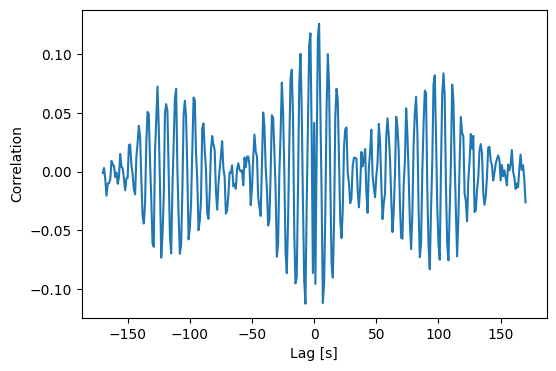
We can see that the cross-correlation spectrum peaks at a non-zero lag. We can get the exact time lag from the time_shift attribute of the CrossCorrelation instance:
[19]:
print(f'g leads i by {cross_corr.time_shift}s')
g leads i by 3.999603632837534s
When we generated this data, we were told that the \(i\)-band variability has a phase lag of 3.142 (i.e., \(1 \pi\)) radians, while the \(g\)-band variability has a phase lag of 0 radians. We can convert this time lag into a phase lag by dividing it by the period of the variability:
[20]:
print(f'Phase lag: {2 * np.pi * cross_corr.time_shift / p_signal.to_value(u.s)} radians')
Phase lag: 3.3925838553522305 radians
The phase lag is a little higher than expected, but this is due to the time resolution of our light curves.
Cross-correlating works well provided the light curves are dominated by the signal of interest. In many cases, however, light curves show variability on many time-scales, and we may want to isolate the lags of signals at specific frequencies. In such cases, it may be preferable to compute the cross-spectrum.
Cross-spectra
A Cautionary Tale
To compute cross-spectra, we can use stingray’s AveragedCrossspectrum class:
[21]:
from stingray import AveragedCrossspectrum
from matplotlib import pyplot as plt

segment_size = 30 * u.s

avg_cs = AveragedCrossspectrum.from_lightcurve(
    lc1=stingray_lcs['1:g'],
    lc2=stingray_lcs['3:i'],
    norm='frac',
    segment_size=segment_size.to_value(u.s),  # stingray assumes all time values are in seconds
)

avg_cs_amplitude = np.abs(avg_cs.power)

fig, ax = plt.subplots(tight_layout=True)

ax.step(
    avg_cs.freq,  # convert freq from cyc/d to Hz
    avg_cs_amplitude,
    where='mid',
    c='k',
)

ax.set_xlabel('Frequency [Hz]')
ax.set_ylabel('Power [(frac. rms)$^2$ / Hz]')

plt.show()
8it [00:00, 20610.83it/s]
/home/zac/miniforge3/envs/opticam6/lib/python3.14/site-packages/stingray/fourier.py:1134: UserWarning: n_ave is below 30. Please note that the error bars on the quantities derived from the cross spectrum are only reliable for a large number of averaged powers.
  warnings.warn(
/home/zac/miniforge3/envs/opticam6/lib/python3.14/site-packages/stingray/fourier.py:1161: RuntimeWarning: invalid value encountered in sqrt
  dphi = np.sqrt((1 - gsq) / (2 * gsq * n_ave))
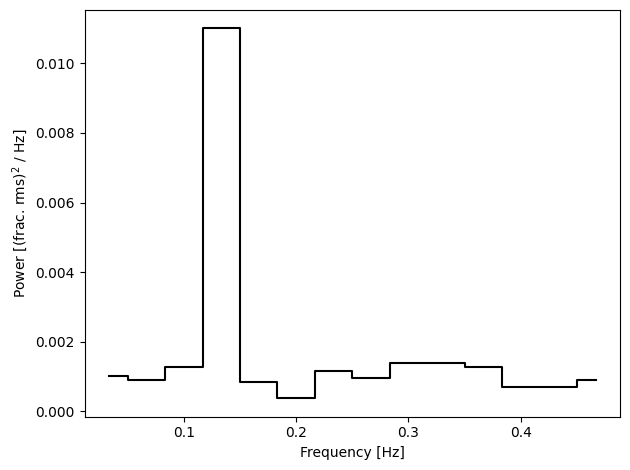
As we can see, the cross spectrum amplitude looks similar to the Lomb-Scargle periodograms we saw earlier, which is what we would expect. So far so good. Let’s try to compute the coherence between these two light curves and check it’s in the expected range (\(0 \leq \text{coherence} \leq 1\)):
[22]:
coh, coh_err = avg_cs.coherence()

print(np.logical_and(coh >= 0, coh <= 1).all())
False
/home/zac/miniforge3/envs/opticam6/lib/python3.14/site-packages/stingray/utils.py:487: UserWarning: SIMON says: Number of segments used in averaging is significantly low. The result might not follow the expected statistical distributions.
  warnings.warn("SIMON says: {0}".format(message), **kwargs)
Uh oh, we have unphysical coherence values! Let’s take a look at some of them:
[23]:
for i in range(5):
    print(f'Coherence: {coh[i]}, error: {coh_err[i]}')
Coherence: 125255.43870084993, error: -22164677.960628927
Coherence: 155590.86632007017, error: -30686217.678394
Coherence: 75731.82468126377, error: -10420340.272177516
Coherence: 849.3315903170263, error: -12361.588510501326
Coherence: 157376.1830838678, error: -31215892.516184118
Our coherence estimates are in the thousands, and our error estimates in the negative thousands. Something is very wrong…
The issue is due to stingray assuming Poisson statistics. Since we know the phase lag between these two light curves, let’s see what happens if we try to compute it from the averaged cross spectrum:
[24]:
plags, plags_err = avg_cs.phase_lag()

fig, ax = plt.subplots(tight_layout=True)

ax.errorbar(
    avg_cs.freq,
    plags / np.pi,
    plags_err / np.pi,
    fmt='kx',
)

ax.axvline(
    0.135,
    c='red',
    label='Lag frequency'
    )
ax.axhline(
    -1,
    c='blue',
    label='Expected lag'
    )
ax.legend()

ax.set_xlabel('Frequency [Hz]')
ax.set_ylabel('Phase lag [$\\pi$]')

plt.show()
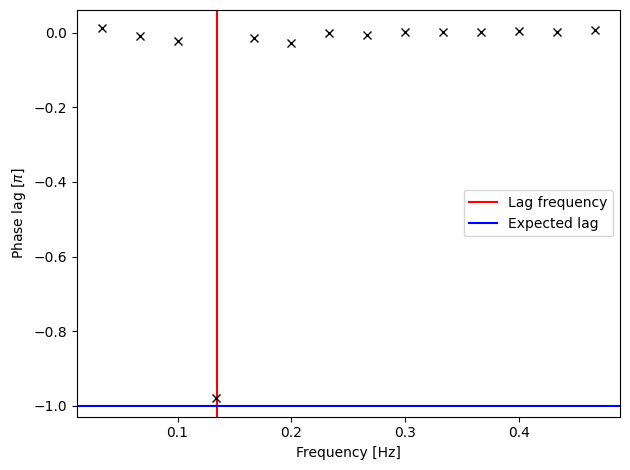
We get the correct phase lag at the correct frequency. However, we don’t seem to have any error bars, and so it’s impossible to quantify the significance of this lag. Let’s see what our error bars are:
[25]:
print(plags_err)
[nan nan nan nan nan nan nan nan nan nan nan nan nan nan]
Our errors are all NaNs! This is another consequence of our light curves not having Poisson errors.
A Hacky Fix
To work around stingray’s requirement for Poisson errors, we can trick it into thinking our relative light curves are actually in units of counts by scaling them by a suitably large value (e.g., 10,000).
[26]:
from stingray import Lightcurve

scale_factor = 1e4

lc = stingray_lcs['1:g']
f = lc.counts * scale_factor
err = lc.counts_err * scale_factor
g_lc = Lightcurve(lc.time, counts=f, err=err, gti=lc.gti)  # do not pass errors or define err_dist

lc = stingray_lcs['3:i']
f = lc.counts * scale_factor
err = lc.counts_err * scale_factor
r_lc = Lightcurve(lc.time, f, err=err, gti=lc.gti)  # do not pass errors or define err_dist

avg_cs = AveragedCrossspectrum.from_lightcurve(
    g_lc,
    r_lc,
    segment_size=segment_size.to_value(u.s),  # segment size in seconds
    norm='frac',
    )
8it [00:00, 26317.20it/s]
The fractional RMS normalisation (norm='frac') is scale-invariant, so it should give us the same relative amplitudes. Let’s now try to compute the averaged cross spectrum, coherence, and phase lags using our scaled light curves:
[27]:
fig, ax = plt.subplots(tight_layout=True)

ax.step(
    avg_cs.freq,
    avg_cs_amplitude,
    where='mid',
    c='k',
)

ax.set_xlabel('Frequency [Hz]')
ax.set_ylabel('Power [(frac. rms)$^2$ / Hz]')

plt.show()
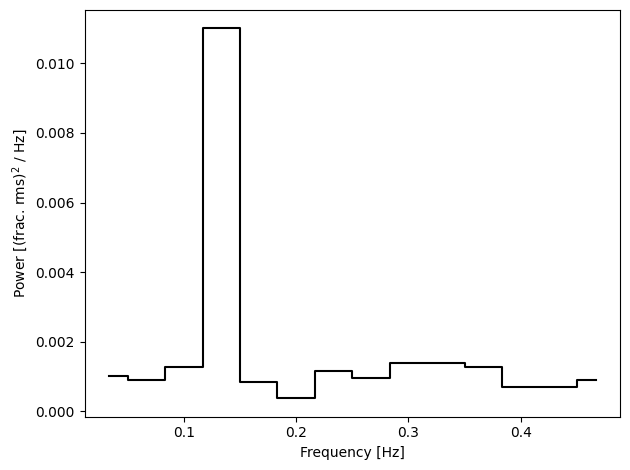
Reassuringly, the averaged cross spectrum looks the same as before. Let’s see if we can compute the coherence this time:
[28]:
fig, ax = plt.subplots(tight_layout=True)

coh, coh_err = avg_cs.coherence()

ax.errorbar(
    avg_cs.freq,
    coh,
    coh_err,
    c='black',
)

ax.set_xlabel('Frequency [Hz]')
ax.set_ylabel('Coherence')

plt.show()
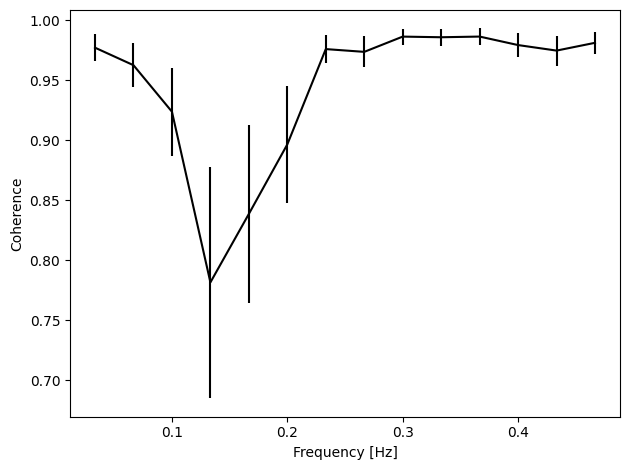
We have a coherence plot with all values in the physical range 0 \(\leq\) coherence \(\leq\) 1!
Let’s see how the phase lags look now:
[29]:
plags, plags_err = avg_cs.phase_lag()

fig, ax = plt.subplots(tight_layout=True)

ax.errorbar(
    avg_cs.freq,
    plags / np.pi,
    plags_err / np.pi,
    fmt='kx',
)

ax.axvline(
    0.135,
    c='red',
    label='Lag frequency'
    )
ax.axhline(
    -1,
    c='blue',
    label='Expected lag'
    )
ax.axhline(
    0,
    c='black',
    ls='--'
    )
ax.legend()

ax.set_xlabel('Frequency [Hz]')
ax.set_ylabel('Phase lag [$\\pi$]')

plt.show()
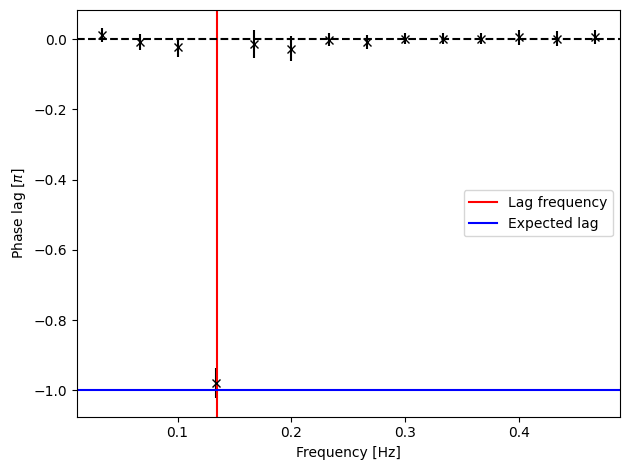
We have errors on our phase lags, and now we can tell that the lag is consistent the correct value! Let’s quantify its significance:
[30]:
print(np.abs(plags / plags_err).max())
23.09016688178772
[31]:
fig, ax = plt.subplots(tight_layout=True)

ax.step(
    avg_cs.freq,
    np.abs(plags / plags_err),
    where='mid',
    c='black',
)

ax.fill_between(
    ax.set_xlim(),
    -5, 5,
    color='grey',
    alpha=.5,
    edgecolor='none',
)

ax.axvline(
    0.135,
    c='red',
    label='Lag frequency'
    )

ax.legend()

ax.set_xlabel('Frequency [Hz]')
ax.set_ylabel('Phase lag significance')

plt.show()
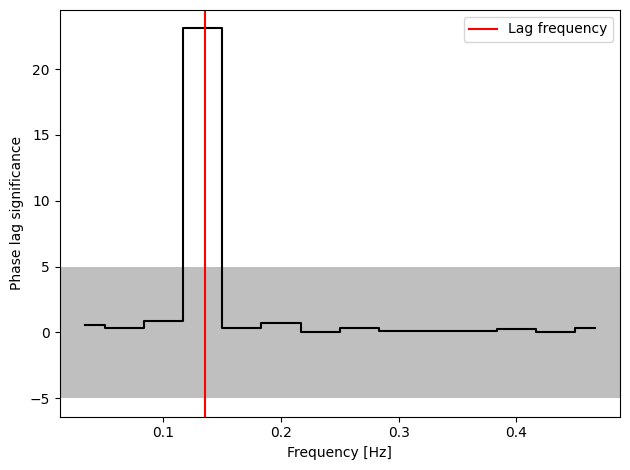
Now we can see that the phase lag is significant to \(\gg 5 \sigma\), as we would hope.
That concludes the timing methods tutorial for opticam! The timing methods of Analyzer demonstrated here are intended as “quick-look” analyses, while more complete analyses are made easy thanks to stingray. Note, however, that special care is needed to get the most out of stingray.